W-01 · Case study
devklean
A cleanup tool is only useful if you trust it enough to run it casually. devklean earns that by making every deletion reversible, then making the dangerous cases slow.
- Shipped — published on PyPI, CI on GitHub Actions
- Linux, macOS, Windows (interactive mode: Linux/macOS)
- Author, maintainer
- pipx install devklean
- Python 3.8+ · send2trash · curses · TOML config · GitHub Actions · PyPI
Thesis
Make deletion reversible first. Then make it boring.
§ 01
The problem
Development folders quietly fill with directories that can be regenerated: node_modules, .venv, .next, build output, caches. The obvious fix — a find piped into rm -rf — is a loaded tool. One wrong path or an overeager pattern and real work is gone for good.
Most cleaners either don't know what is safe to remove, or remove it irreversibly. I wanted something I would actually run on my own projects without a second thought.
§ 02
The governing idea
Nothing is ever permanently deleted. Every item goes to the operating system's own trash through send2trash — the Recycle Bin on Windows, Trash on macOS, the freedesktop trash on Linux. A mistake costs a trip to the trash, not a lost afternoon.
Once deletion is recoverable, the remaining job is friction in the right places: none for the everyday case, a lot for the unusual one.
§ 03
The system
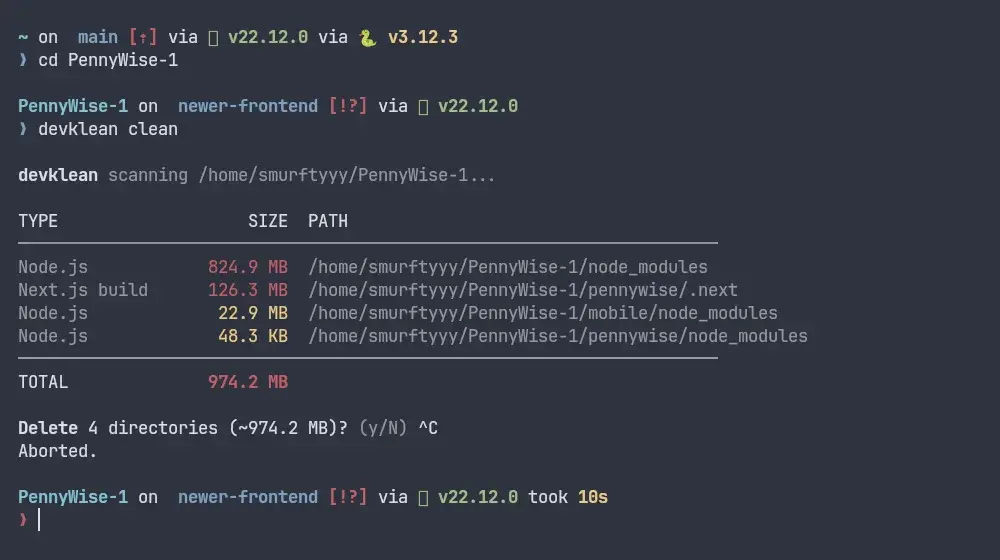
A run moves through six stages. The scanner walks the tree and matches known artifact directories. An artifact registry identifies each one — ecosystem, what generates it, risk tier — which also powers the read-only analyze and explain commands. A safety validator then refuses anything that should never be touched. Confirmation follows, then the move to trash, then a metadata record that devklean history and devklean doctor read later.
Step through the diagram to see where each safeguard sits, and what happens on a dry run, on a protected path, and on a very large deletion.
Diagram 01
How devklean decides what to remove
devklean clean ~/code/my-app finds node_modules, .venv and dist (well under 1 GiB).
Walk the target tree and match known artifact directories, measuring the size of each.
Every stage, in words
- 01Scan (scanner/) — Walk the target tree and match known artifact directories, measuring the size of each.
- 02Identify (signatures/registry) — Look each directory up in the artifact registry: ecosystem, what regenerates it, risk tier. Unknown directories get no invented verdict.
- 03Validate (deletion/safety.py) — Resolve real paths and refuse protected system directories, home, mount roots and symlinks.
- 04Confirm (cli/confirmation.py) — Show what will go and how big it is. y/N for normal runs; typed DELETE at or above the size threshold.
- 05Trash (deletion/trash.py) — Move each item to the OS trash with send2trash. Recoverable from the file manager.
- 06Record (deletion/metadata.py) — Write what was moved, when, and how big — read by
historyand checked bydoctor.
§ 04
Constraints
Three different trash implementations sit behind one behavioural promise. Interactive selection is built on Python's curses, which doesn't exist on Windows — so clean -i on Windows prints a clear message and exits without changing anything, rather than crashing.
Supporting Python 3.8 upward limits syntax and dependencies; TOML parsing is backfilled with tomli below 3.11.
- Refused outright: the filesystem root, the home directory, mounted drive roots, protected system directories such as /etc and /usr.
- Symbolic links are blocked unless
--allow-symlinksis passed. - Deletions totalling at least
confirm_threshold(1 GiB by default) require typing DELETE.--yesdoes not bypass this; only--dry-runskips it, because it deletes nothing.
§ 05
Decisions and trade-offs
Optional compression (--compress) archives large directories before trashing them, so they take less room while they wait in the trash. The order matters: compress to a temporary archive, verify it by test-extracting every entry and cross-checking file count and total size, send the archive to trash, and only then remove the original. If any step fails, the original directory is left untouched.
Compression is off by default so existing scripts are never surprised by archives appearing in the trash. Restoring a compressed item is a manual extract for now — an honest limitation rather than a half-built feature.
§ 06
What changed
An earlier version of the compression path removed the original directory after archiving but before verification and before send2trash had run — so a later trash failure meant the data was already gone. The fix reordered the steps as described above, and the test suite now asserts that a failure at verification or at the trash step leaves the source intact.
§ 07
Current state
Published on PyPI, tested in CI on GitHub Actions, with a small project page. Configuration is layered (project .devklean.toml over a global file over defaults), output can be JSON for scripting, and logs rotate under the user cache directory.
§ 08
Next
- Interactive mode on Windows.
- Automatic decompression when restoring a compressed item.